
News Blog & Press
How To Get More Traffic To Your Site
Private browsers prevent your website analytics from seeing this web traffic.
News | Back to all news |
Private browser prevent your web analytics from seeing visitors on your site.
Online privacy is a good thing but not if your business relies on where your web traffic is coming from.
Private browsers like Brave, Firefox and Tor block third party cookies. Your web analytics uses a third party cookie to identify a visitor on your site.
Seeing who is on your website, and where they came from is about to get A LOT WORSE. Google’s Federated Learning of Cohorts, or FLoC, is going to block third party cookies with their Chrome browser.
Web Analytics like StatCounter or Google Analytics cannot see these visitors on your site.
There is a solution that can identify EVERY PRIVATE BROWSER that visits your site, and what site they came from.
Traffic Catch is the only web analytics solution that can see EVERY VISITOR on your site.
Traffic Catch sees every visitor to your site which will automatically increase your web traffic.
If your site sells a good or service, it is imperative that you know what ad, blog post, video or affiliate is referring your traffic.
With the current web analytics you have no idea of where your traffic is coming from.
Traffic Catch is the best web analytics because it tells you who visited your site, where they came from, pages they visited, their IP address, city, state, country and their Internet provider.
Your web analytics can see EVERY private browser like Brave, Firefox, Tor and DuckDuckGo..
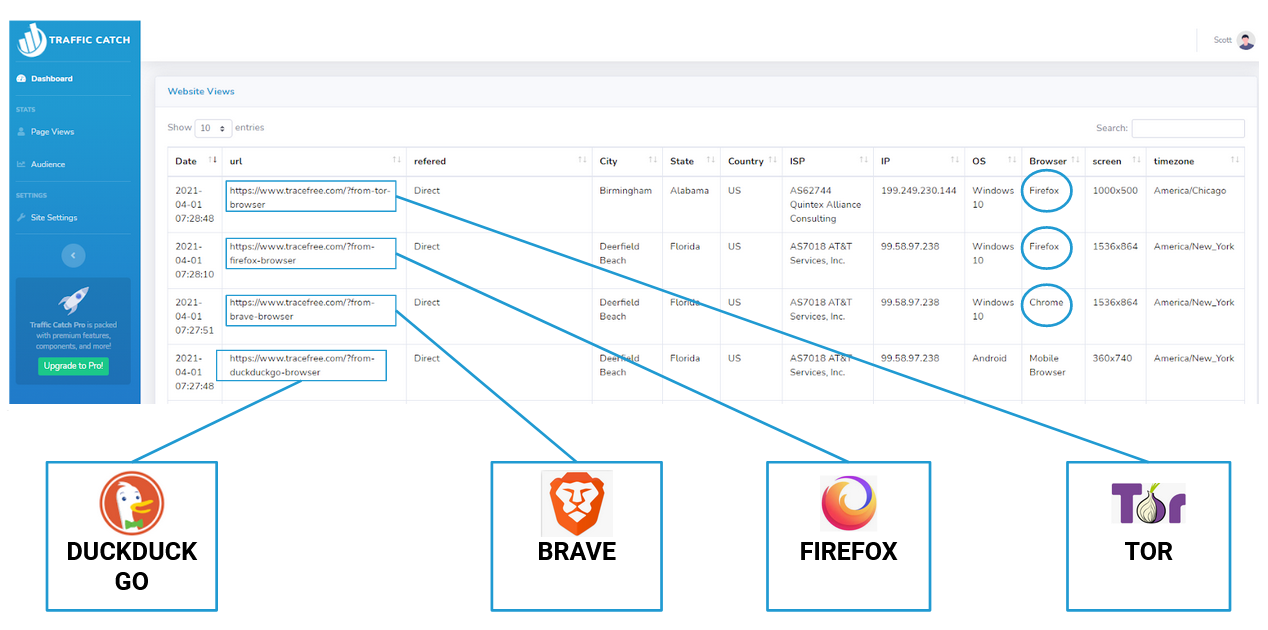
When you want to see all of your web traffic, get Traffic Catch.
If you don’t believe your web analytics misses private browser traffic, simply go to the Traffic Site and hit the “Proof” button.
They will go to your site using a private browser and prove to you that your analytics cannot see the visit.
For those that need to see every visitor on their site, get Traffic Catch today.
Popular Posts
- A True Online Privacy Test
- Dept of Defense Adopts Cloud Browser
- Online Privacy Tips
- A Virus Free Browser For Windows
- 4 Things A VPN Won't Tell You
- Google Is Tracking You On Sex Sites
- How To Hide Your Identity Online
- The Difference Between TraceFree & A VPN
- How To Always Get The Lowest Prices On Amazon
- There's No Such Thing As A Private Search Engine






Introducing Trace Free

The Safest Way To Browse The Web
“Always Safe Always Private Browsing”